
はじめに
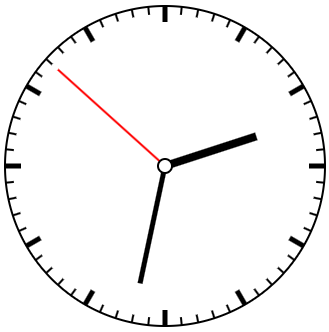
この記事では、HTMLのcanvas要素とJavaScriptのみを用いてアナログ時計を作成します。
ホームページなどに手軽にアナログ時計を置くことができるようになります。
コード作成
canvas要素の作成
まずはHTML内にcanvasを定義します。この要素にアナログ時計を描画していきます。
<canvas id="clock" width="400" height="400"></canvas>描画設定
次にJavaScriptを記述していきます。まずは、setInterval()を用いて1秒ごとに時計の再描画を定義します。今回は、描画関数clock()を定義します。初期描画時にすぐ描画できないため、初回だけは描画関数を明示的に呼び出してあげます。
window.onload = () => {
  clock();
  setInterval("clock();", 1000);
};
描画処理
描画関数clock()の処理を作成します。
まずは、canvas要素を指定するため要素のidをgetElementByIdを用いて取得します。取得したcanvasからcontextを取得して描画を操作します。そのほか、座標関係と半径は頻繁に使用しますのでここで定義します。また、時刻の取得も行っておきます。
// canvas要素を指定
const canvas = document.getElementById("clock");
// 環境を取得
const ctx = canvas.getContext("2d");
// 描画終端座標
const endPoint = {x: canvas.width, y: canvas.height};
// 中心座標
const center = {x: endPoint.x / 2, y: endPoint.y / 2};
// 半径
const rad = endPoint.x * 0.8 / 2;

// 時刻取得
const now = new Date;
const hh = now.getHours();
const mm = now.getMinutes();
const ss = now.getSeconds();
時分秒の針やメモリは似たような処理で描画を計算するためクロージャーを作成します。通常の関数で定義しても問題ありません。分割数とn番目を指定することで円上の座標を返却します。
// center=中心座標, rad=半径, num=分割分子, den=分割分母, size=描画長((1-size)*100%)
const getLine = (center, rad, num, den, size) => {
  const x = center.x + (Math.cos(Math.PI * 2 * (num / den) - Math.PI / 2) * rad) * size;
  const y = center.y + (Math.sin(Math.PI * 2 * (num / den) - Math.PI / 2) * rad) * size;
  return [x, y];
}
1秒ごとに再描画するため、いったん描画をすべてリセットします。
ctx.clearRect(0, 0, endPoint.x, endPoint.y);最後に、算出した座標などを用いてcanvasに描画を実施します。上記で作成したgetLine関数の戻り値をmoveToやlineToの引数として渡したいためスプレッド展開しています。
// 時計枠
ctx.strokeStyle = "black";
ctx.beginPath();
ctx.lineWidth = 2;
ctx.arc(center.x, center.y, rad, 0, Math.PI * 2);
ctx.stroke();

// 目盛り
for (var i = 0; i < 60; i++) {
let arg = [];
ctx.beginPath();
if (i % 5 === 0) {
  ctx.lineWidth = 5;
  arg.push(60 , 0.9);
} else {
  ctx.lineWidth = 2;
  arg.push(60, 0.95);
}
ctx.moveTo(...getLine(center, rad, i, ...arg));
ctx.lineTo(...getLine(center, rad, i, 60 , 1));
ctx.stroke();
}

// 時針
ctx.beginPath();
ctx.lineWidth = 8;
ctx.moveTo(center.x, center.y);
const m = 0.2 * Math.floor(mm / 12);  // 分に連動して時針も動かす計算
ctx.lineTo(...getLine(center, rad, hh + m, 12, 0.6));
ctx.stroke();

// 分針
ctx.beginPath();
ctx.lineWidth = 5;
ctx.moveTo(center.x, center.y);
ctx.lineTo(...getLine(center, rad, mm, 60, 0.75));
ctx.stroke();

// 秒針
ctx.beginPath();
ctx.strokeStyle = "red";
ctx.lineWidth = 2;
ctx.moveTo(center.x, center.y);
ctx.lineTo(...getLine(center, rad, ss, 60, 0.9));
ctx.stroke();

// 中心軸
ctx.beginPath();
ctx.strokeStyle = "black"
ctx.fillStyle = "white"
ctx.arc(center.x, center.y, 7, 0, Math.PI * 2, true);
ctx.fill();
ctx.stroke();
以上でアナログ時計の完成です。描画部分を変更することでいろいろな時計にアレンジすることもできますのでチャレンジしてみてください。
動作イメージ
全体コード
最後に全体のコードを展開します。コピペしてそのまま使用していただいても構いません。
<!DOCTYPE html>
  <head>
    <title>AnalogClock</title>
    <script src="analogClock.js"></script>
  </head>
  <body>
    <canvas id="clock" width="400" height="400"></canvas>
  </body>
</html>
window.onload = () => {
clock();
setInterval("clock();", 1000);
};
function clock() {
const canvas = document.getElementById("clock");
const ctx = canvas.getContext("2d");
const endPoint = {x: canvas.width, y: canvas.height};
const center = {x: endPoint.x / 2, y: endPoint.y / 2};
const rad = endPoint.x * 0.8 / 2;
// 時間取得
const now = new Date;
const hh = now.getHours();
const mm = now.getMinutes();
const ss = now.getSeconds();
// ラインの起点を求める
const getLine = (center, rad, num, den, size) => {
const x = center.x + (Math.cos(Math.PI * 2 * (num / den) - Math.PI / 2) * rad) * size;
const y = center.y + (Math.sin(Math.PI * 2 * (num / den) - Math.PI / 2) * rad) * size;
return [x, y];
};
// 描画リセット
ctx.clearRect(0, 0, endPoint.x, endPoint.y);
// 時計枠
ctx.strokeStyle = "black";
ctx.beginPath();
ctx.lineWidth = 2;
ctx.arc(center.x, center.y, rad, 0, Math.PI * 2);
ctx.stroke();
// 目盛り
for (var i = 0; i < 60; i++) {
let arg = [];
ctx.beginPath();
if (i % 5 === 0) {
ctx.lineWidth = 5;
arg.push(60 , 0.9);
} else {
ctx.lineWidth = 2;
arg.push(60, 0.95);
}
ctx.moveTo(...getLine(center, rad, i, ...arg));
ctx.lineTo(...getLine(center, rad, i, 60 , 1));
ctx.stroke();
}
// 時針
ctx.beginPath();
ctx.lineWidth = 8;
ctx.moveTo(center.x, center.y);
const m = 0.2 * Math.floor(mm / 12);
ctx.lineTo(...getLine(center, rad, hh + m, 12, 0.6));
ctx.stroke();
// 分針
ctx.beginPath();
ctx.lineWidth = 5;
ctx.moveTo(center.x, center.y);
ctx.lineTo(...getLine(center, rad, mm, 60, 0.75));
ctx.stroke();
// 秒針
ctx.beginPath();
ctx.strokeStyle = "red";
ctx.lineWidth = 2;
ctx.moveTo(center.x, center.y);
ctx.lineTo(...getLine(center, rad, ss, 60, 0.9));
ctx.stroke();
// 中心軸
ctx.beginPath();
ctx.strokeStyle = "black"
ctx.fillStyle = "white"
ctx.arc(center.x, center.y, 7, 0, Math.PI * 2, true);
ctx.fill();
ctx.stroke();
}

コメント